
Finding a free utility to unlock pdf documents is just a matter of single search on Google. On the other hand, Google does not throw up impressive results if you search for something like how to password protect a pdf file. Most of the results points you to the paid utilities.
Here is a software and step by step instructions you can use to password protect your pdf document for free:
The utility is Pdf creator from PrimoPDF
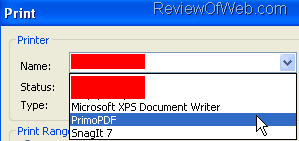
- Once you download the PDF creator and install it. It will appear in the print dropdown. (File > Print). Click OK to convert any document to PDF.
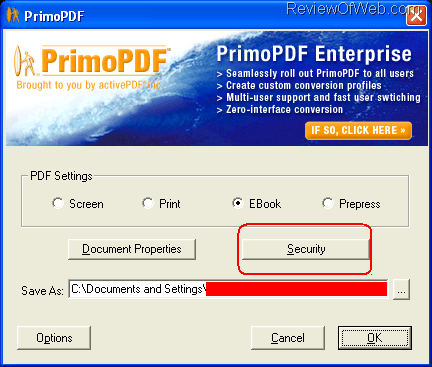
- You will see the screen shown below. Click on Security button.
- On the next window, enter the ‘Password to Open’ which will allow you to password protect your pdf . You can also enter ‘Password to Change Security’. This option allows you to change security settings that:
- Allow users to print my PDF
- Allow users to copy text and graphics from my PDF
- Allow users to add comments
- Allow users to change my PDF, including editing text and adding or removing pages
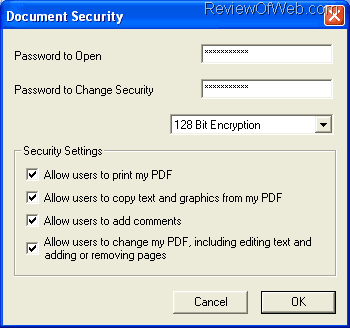
- Click on OK in the screen shown above. Click OK again on the last screen.
- Your free password protected PDF is ready. Enjoy!
Also see the cool utilities from A-PDF. This company has come up with various solutions to perform operations on PDF files. Some of them are Batch unsecure PDF files, Put page numbers on bottom of PDF, Insert date time stamp to a Acrobat PDF, Split PDFs at pages matching specific text pattern. Check them out.
Related:

 Ankur Jain is a Software Engineer in Test Automation. After a 5 years stint with Accenture and Oracle, he started his eLearning company. A long-time blogger and proud owner of the "Learn" series of websites.
Very useful tool !!!! Great !!!!
Thanks for good article. I also tried this free software, cipherbox from cipherbox.wordpress.com, And found it is good enough especially when handling my documents in batch. It provides built-in encryption and supports both Office and PDF files. For entire folder, you can also zip it with a password. So it looks to be a quite useful tool.
Hi Smiggy, you could also try http://www.pdfsecure.net/ which has a lot of options! No downloads required and it happens in your browser. Nifty.
Or, online pdf protect :
http://www.biclim.com/protectPdfDocumentInit.action
Tried pdfcreator from Primo but didn’t like it as it dropped all the embedded hyperlinks – or is there a way of preserving them? I want something (preferably free) that allows me to password protect pdf files AND maintains hyperlinks. Any ideas?
Thanks
Thanks for giving the info about the Primo Pdf. Its really cool.
This is a great solution EXCEPT for the fact that the password and file can be freely shared. Password protection is meaningless unless the password registers the file to the user’s computer. To properly protect your PDF from unauthorized access, you need a solution like File Secure Pro.
You can use PDF Password Remover to Reremove password-protection or encryption from the PDF
document. Advanced PDF Password Remover is a free tool which removes encryption from PDF files.
It removes all the basic restrictions on printing, copying and editing the content of PDF files.
It also removes password protection, if any, from the file.
http://www.advancedpdfconverter.com/products/pdfpasswordremover.html
Before , I was confronted with the PDF password problem. Finally , my friend Fiona recommend the PDF password unlocker .It helps me access my password protected pdf. http://www.password-unlocker.com/
Nice software but you still have to download and install. A better option is a tool that does the samething for free right inside your browser like at ProtectYourPDF. See http://www.protectyourpdf.com/ProtectYourPDF/index.cfm
@Dan. Thanks for the info.
The software I mentioned above is completely free of cost while protectyourpdf is free for 30 mins only!
This is what it has to say Free for 30 minutes. 10 days unlimited use for $10. One year unlimited use for $50.