
Recently, Google started rolling out Adsense integration with Google Analytics. [If you have not got your invitation, fill out this form and Google will update you in 24hrs, I got it that ways!]
So far so good. The problem occurred when I clicked on the invitation link –Integrate with Google Analytics-on my adsense home page. It prompted me to either create a free account or use the existing analytics account.
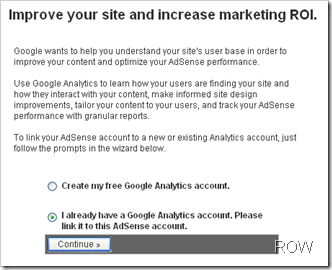
I use two Google Accounts, one for adsense and the other for Gmail, Analytics, Orkut etc. After clicking on continue, this is what it had to say
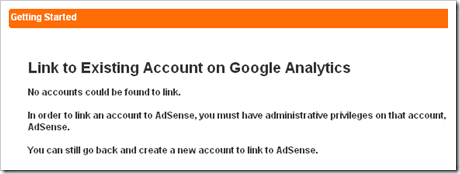
There was no link , no option there to link adsense with the other Google Analytics account. If you are facing a similar problem here is what you can do:
- Go to your Google Analytics Account.
- Click on Analytics Settings on the top left side.

- Scroll down on this page and click on User Manager.
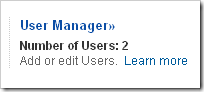
- Click on Add user link given on right side.
- On the next page, enter your adsense email address.
- Make access type as Account Administrator. [For some unknown reasons the integration would not work for View Reports account type]
- Select all the website you want to grant access and move them to right hand side.
- Save changes.
- Now go to your adsense account home page and click on Integrate with Google Analytics. You will see a similar page as shown in image on the top.
- Click on continue and you will find all your website names populated there. Enjoy!

 Ankur Jain is a Software Engineer in Test Automation. After a 5 years stint with Accenture and Oracle, he started his eLearning company. A long-time blogger and proud owner of the "Learn" series of websites.
Same doubt like MIKE – by the way – his keywords were WHO brought me here in the 1st place!
I know Google can’t track multiples accounts, at least not YET!
But should generating new profiles inside ONE previous account be the ONLY SOLUTION? What if I have 100 websites? 3 YEars has passed, google staffs did not realize a method?
I would borrow to insert a 3rd code inside each side, but letting accounts BE, creating new ones inside each profile and letting it’s history aside THEM generating new CODES… Are we in 1911 or 2011?
What if i want to link 2 analytics accounts to 1 adsense account? Will that be possible? Thanks!
Well, I face another problem. Google is contradicting itself when it comes to linking adsense and analytics. Here’s why:
When you add the analytics tracking code only, they say to put the code just before the closing head tag. (Copy the following code, then paste it onto every page you want to track immediately before the closing head tag.)
Now, when they advise you to put the adsense tracking code, they say this:
Paste this code at the top of any webpage in this domain that contains AdSense ads.
CODE HERE…
Be sure to leave the Google Analytics tracking code at the bottom of your pages.
So, who do I listen to?
@Toronto Stay: I don’t think that would make any difference. Just try putting the code in header, it should work.
Thank you very much, i was also facing the same issue as i am using two different gmail accounts, i hope this could solved my problem. thanks again. 🙂
You’re Welcome! 🙂
What do you mean when you say “it doesn’t seem to recognise my adsense email in analytics.”
I suggest you to follow the exact same steps given above.
Was it really that simple for you? I’ve tried doing just that and it doesn’t seem to recognise my adsense email in analytics.