
So you have accumulated hundreds (or even thousands?) of Google Toolbar bookmarks over the years and now want to delete the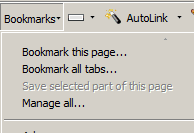 m all. Well, Google provides a way but for some reason it is undocumented. A very intuitive option should be the Bookmarks menu option of the Google Toolbar but the delete all option is not available there.
Here is a step-by-step procedure of how you can delete all bookmarks from Google at a click of a button:
- Go to Google Bookmarks
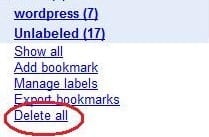
- Scroll down. On the left hand side you will see Delete all link.
- Now you know what to do. Enjoy.

 Ankur Jain is a Software Engineer in Test Automation. After a 5 years stint with Accenture and Oracle, he started his eLearning company. A long-time blogger and proud owner of the "Learn" series of websites.