
Gmail labs have come out with a interesting new feature, you can now directly get your Gmail signatures before the quoted text in a reply.
Earlier when we use to click on ‘Reply’ , our Gmail signatures used to get appended on the end of mail and not where you expected.
Follow this path to set it up:
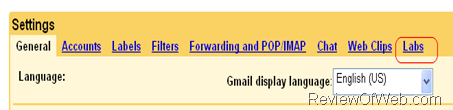
- Go To Gmail > Settings(on top right)
- Click on ‘Labs’.
- Scroll down to Enable ‘signature tweaks’
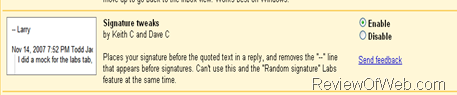
- Done! To test, just reply to any message …you will now find that the your signature has been appended before the quoted text.

 Ankur Jain is a Software Engineer in Test Automation. After a 5 years stint with Accenture and Oracle, he started his eLearning company. A long-time blogger and proud owner of the "Learn" series of websites.
It looks like there is no need for this labs feature anymore, it’s part of the default Gmail options. Explained on Gmail’s help page for signatures, section “Insert signature above quoted text in replies”, which also has the nice side effect of removing the “–” line that precedes it 😉
https://support.google.com/mail/answer/8395?hl=en
I swear to you that “signature tweaks” is not under my Labs. Please help, I hate that my company switched from Outlook to Gmail & my boss asked me to find out how to have automatic signatures on replies. I’m convinced it’s not possible.
I am sure in sometime, you would thank your company for making you switch to Gmail.
This feature has now moved to LIVE environment and can be found under Gmail Settings > General > Signature section.
Thanks
Please suggest some convenient way to add signatures to specific mails and ignoring in others.
Thank you, thank you, thank you, thank you!
I don’t get the sense of having the signature at the very end to envelope the message @_@
Why is this not the default? It seems like it should be this way for most users. Thanks for the tip.
That is exactly what I was looking for since I am using gmail!
Wow, thanks for posting this. I was going crazy before realizing this could be fixed so easily.
FYI, the Google Calendar gadget (also within Gmail Labs) is useful. I’d recommend also enabling the Navbar Drag and Drop within Labs to position the Calendar at the upper left side of your screen.
-JU
You may want to check out the following add-on for Firefox that lets you easily manage multiple rich HTML signatures for each address you have set up in Gmail:
http://blankcanvasweb.com/pages/detail/id_9/n_gmail_signatures/