
I recently attended an excellent webinar conducted by Lon and Michelle from LearnCamtasia . One of the points Lon mentioned was regarding “Quality” settings of the production. He suggested to use 100% quality and don’t really bother about the default Camtasia settings.
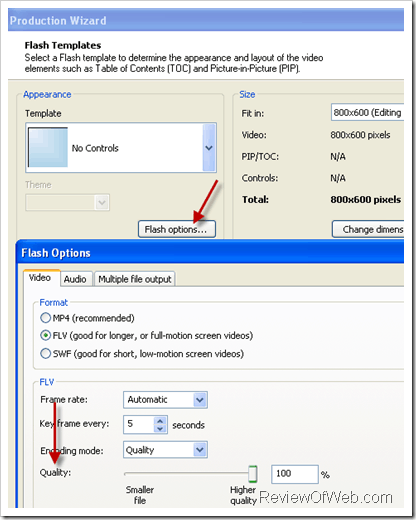
The techie in me came into action and I then produced a 5 mins project (flv) in various settings just to see the impact quality settings would have on size of the published output
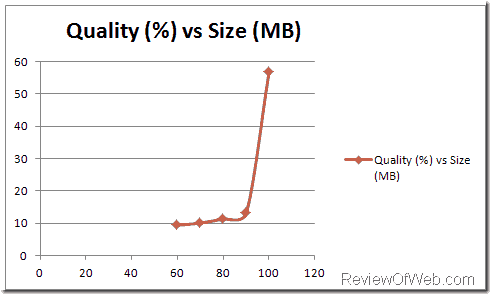
Here are the results (with some surprise) :
|
Quality (%) |
Size (MB) |
|
60 |
9.43 |
|
70 |
10.09 |
|
80 |
11.4 |
|
90 |
13.11 |
|
100 |
56.73 |
Graphs scales well for 60% -90% quality range with only a minor increase in size but as soon as the quality grows to 100%, size of the rendered video becomes ~4x the 90% quality settings! . Something beyond me. Any explanations for this behavior?
[Update: May 2017] In case you are looking for an alternative to Camtasia which can help you crank out videos extremely quickly, I have found a new tool and I am loving it. While the regular price is $97, if you sign up during the 7 days free trial, the tool will cost you $47. Check it out.
Lon has came up with a new course on Camtasia and if you’re new or want to hone your skills in Camtasia, I would highly recommend this course.

 Ankur Jain is a Software Engineer in Test Automation. After a 5 years stint with Accenture and Oracle, he started his eLearning company. A long-time blogger and proud owner of the "Learn" series of websites.
Trackbacks/Pingbacks