
The market and demand for eLearning is increasing at an enormous pace, with it the need to build eLearning content in an quick and easy way is also surfacing. We ha ve reviewed several eLearning content creators in the past. Our subject for this review is Raptivity. Now make no mistake, this is not a full fledged eLearning content creator but serves as an add-on to them by helping to add STUNNING interactivity in no time.
Intro
Raptivity – A Rapid Interactivity tool provides you with pre-built interactions which are based on best practices in the industry.These pre-built interactions can be called the back bone of Raptivity. On the one hand they are capable of providing nice looking interactivities in a short span of time, and on the other hand – for the whiz amongst us – they provide a lot of customizations options. The output is in the form of a Flash (SWF) file which can be integrated with almost all eLearning tools out there. Raptivity can also help track score and responses and can provide this information to eLearning tools for SCORM/ AICC tracking with any LMS.
Raptivity has these products to offer:
- Main Raptivity Software: ( also known as Raptivity Essential)
- Raptivity Turbo packs: Used for 3D, Games , Videos and Simulations
- Raptivity Standard Packs: which are further subdivided into Pack1, Pack 2 and Pack3
- Raptivity Booster Packs: Consists of additional 235 interactions
We wish they could mention the usage of all these packs in some easily accessible location. There seems to be some overlap between usage of various packs. A first-time visitor might feel lost on the website. Also we missed “Getting Started” Links on the homepage.
Installation
- Raptivity essential is about 200 MB in size. Installation was a breeze. It took around 3-4 minutes for end to end installation. We would have liked to find a mention of the size in front of the downloadable, so that one knows the approximate time to download.
- Raptivity provides a free trial for 14 days. The trial version allows you to create 20 interactivities from 35 interaction models.
- Once the trial is over you would need to purchase and activate the software. It took us 30 sec to activate Raptivity using online activation mode.
- If you decide to format your machine or transfer the current license to another machine, make sure that you deactivate the Raptivity software before formatting your machine.
- At the time of review it consumed about 50MB of memory when seen from the Task Manager. Not so resource heavy we can say.
Getting Started
As soon as you double click on the Raptivity icon on your desktop you will be greeted with the screen shown below. UI looks pretty slick. They have kept up with the tradition of Web2.0
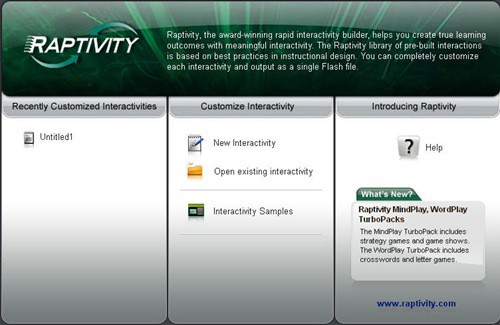
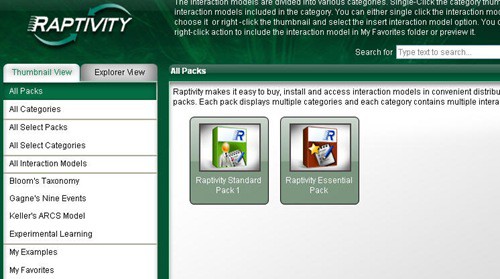
To start creating your first Interactivity, click on ‘New Interactivity’. You will get ‘All Packs’ screen which will list Raptivity essentials along with any additional pack that you have installed.
Creating an Interactivity
For the purpose of this review, we will create a survey. Choose Essential Pack > Surveys > Smile Sheet. After specifying values for Size and no of survey questions, you will get this screen.
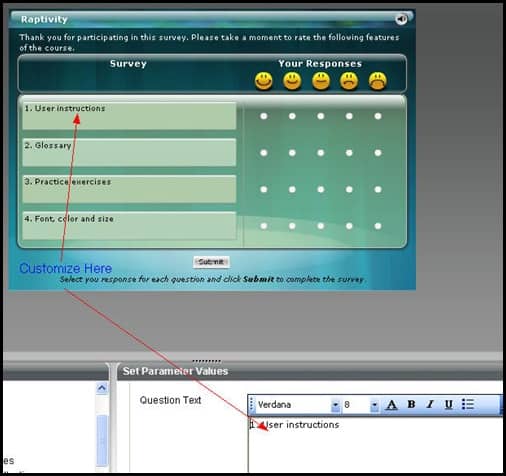
Survey questions, their font etc can be customized using the text editor on the bottom (marked with arrows).
Output
Here is an output of a quick little survey we created in under 5 mins. Needless to say it was a simple exercise and the task was well done by Raptivity.
Cost
The basic – Raptivity Essential – set up will cost you $550 during the offer period, (normally it goes for $750). If you’re interested for other packs, they have various combo offers on their sales page.
Trivia:
- Other than Raptivity Essential, the rest of the packs are about 50 – 70 MB in size.
- We tried enrolling for their Free Weekly webinar. We did get a canned reply saying we will receive another email on instructions on how to connect, but that mail never landed either in our inbox and or in spam folder. This may be a small issue, but things like this make a long-lasting impression on a prospective customer’s mind.
Parting Comments:
While I would strongly like to recommend Raptivity to focus on usability testing for their website and try to make it more user friendly, Raptivity has left me impressed me thoroughly. Other than the minor points of improvements noted above, Harbinger group has created a rock solid product. It looks like Raptivity is all set to make a level playing field for the small players in the eLearning industry where they need not worry about spending a fortune hiring designers. At a fraction of a cost and time, now they too can create impressive interactivities.
Important Links
- For a quick official overview refer Raptivity’s DataSheet.
- 6 Things you may not know about Raptivity
- Free Trial
- Buy
PS: Thank You Amitabh for the review copy.

 Ankur Jain is a Software Engineer in Test Automation. After a 5 years stint with Accenture and Oracle, he started his eLearning company. A long-time blogger and proud owner of the "Learn" series of websites.
Initially, I too faced similar issues. I reached out to Raptivity support team who helped me use my material with Captivate. They also shared a video which I access whenever I am stuck. You can also refer to it. Here is the link. http://www.raptivity.com/resources/insights/raptivity-videos
Please take a note of the revised price of Raptivity Himalaya. It will now cost you $3650. Also, I would like to mention here that to experience Raptivity, you can start with the basic pack which you can get for $395. Other packs can be purchased as per the requirement.
Has anyone had experience using Raptivity with Articulate? Any examples you can share? Also, as mentioned by the author of this blog their site is not very user friendly or intuitive… anyone know how much the FULL Raptivity package would cost?
According to their website, if you want EVERYTHING (aka “the Himalaya pack”), it will end up costing you around $4200.
Also, to the person above, I successfully went to the Raptivity seminar – just FYI. It was very easy to log in and enroll and the person giving the demo was very professional.
While I love the product, I have not been able to get Raptivity to work within Captivate, despite trying several of their fixes. I would like to know if anyone is successfully running Raptivity in Captivate.
You may want to follow the Adobe forum which speaks about integrating Raptivity Integrations with Captivate http://forums.adobe.com/message/2656421#2656421
Definitely against distance learning. Must be a contact!
Good one. BTW, has anybody tried Lectora? They offer a free trial. http://go2see.it/acb