
I use AviScreen Classic for my screen capture purposes and I would say it does a decent job of capturing videos, given that it’s a free version. The only complaint I have with this tool is that the file size generated by it after recording is huge. A one minute recording done through this tool renders a file size of more than 50 MB!!! Uploading such 10 mins videos to youtube will take ages. So how can we utilize this freeware and upload the video after compressing their size?
Enter Windows Movie Maker. A program that resides on every windows powered desktop. A 43 MB series of videos was reduced to 1.3 MB using this tool. Here is how you can do it-
Steps below are for Windows XP, other windows OS should have more or less same navigation path.
- Open Windows Movie Maker by going to Start > All Programs > Accessories > Windows Movie Maker.
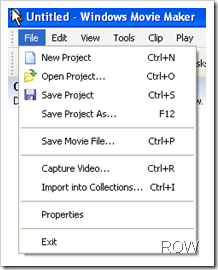
- Go To File > Import into collections.
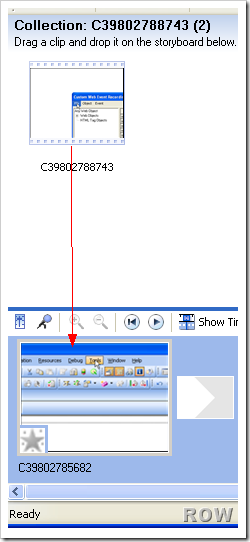
- In the next screen, you will see your movie file(s) on the top. Drag them to the storyboard on the bottom. As shown by the red arrow.
- Now go to File > Save Movie File. Click on the next button.
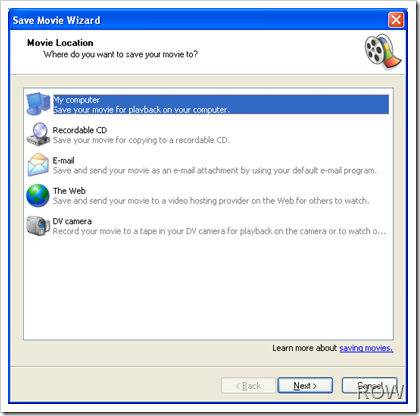
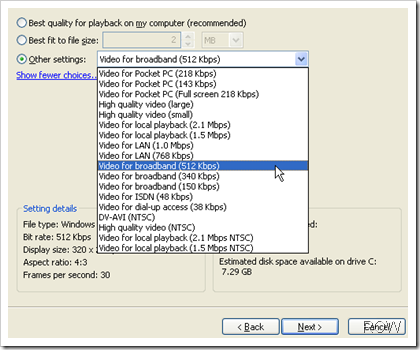
- Enter the desired file name, choose the location to store file and click on next. You will get this screen.
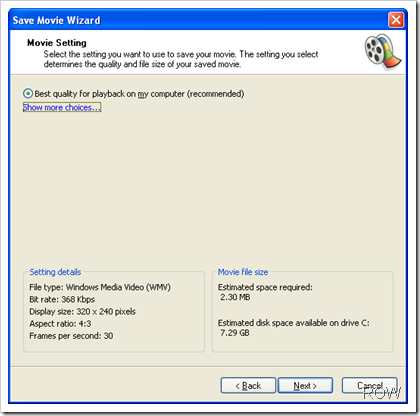
- Click on Show more choices. Choose Other settings radio button and select Video for broadband (512kbps). Click on next.
- On the next screen click on finish and check the video size now.
- Magic 🙂
Enjoy!
Some trivia about Youtube:
- YouTube recommended video/screen size is 320*240px. Recently they have started supporting more formats like 480x360px and 1280*720px
- Videos can be up to 1GB in size and 10 minutes long.
- Accepted youtube video formats are .WMV, .AVI, .MOV, MPEG, .MP4, DivX, .FLV , 3GP
- To view a youtube video in full screen mode just format the URL. Say, the video that you want to see in full screen mode has the URL http://in.youtube.com/watch?v=32176vsadfsf. Simple remove watch? from it and replace = with / so the URL should become http://in.youtube.com/v/32176vsadfsf
- To download youtube video append kiss infront of Youtube. The above URL would become http://in.kissyoutube.com/watch?v=32176vsadfsf

 Ankur Jain is a Software Engineer in Test Automation. After a 5 years stint with Accenture and Oracle, he started his eLearning company. A long-time blogger and proud owner of the "Learn" series of websites.
Trackbacks/Pingbacks