
If you work on a shared computer, you might want to password-protect your excel or word documents. How would you do it? There are a number of commercial tools available for this, but Microsoft provides a free, nice and elegant way.
The first time that I needed this feature, it took me a lot of time researching, so thought of sharing this tip with you all.
If you are using MS Office 2000:
- Open the document.
- Go to File > Save As. Click on Tools on top right side as shown.
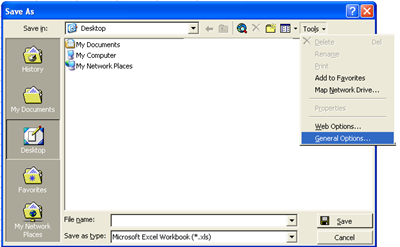
- Click on General Options.
- The next screen will ask you for the password. Fill in your desired password.
- The next time onwards, whenever you open that file, the system will prompt for password.
If you are using higher versions of MS office:
Microsoft has made this process a bit simpler for higher versions. Simply go to Tools > Options > Security tab and fill in the desired password.

 Ankur Jain is a Software Engineer in Test Automation. After a 5 years stint with Accenture and Oracle, he started his eLearning company. A long-time blogger and proud owner of the "Learn" series of websites.