
If you have done a fresh installation of WordPress2.6 or later and use an offline blog editing software like Windows Live Writer, in all probability – while configuring WLW with your blog- you will end up with a message like Blog Server Error- Server Error 405 occured. XML-RP- services-are-disabled-on-this-blog
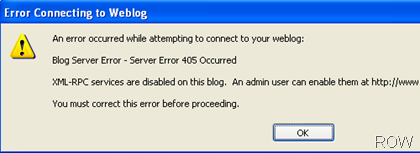
To resolve this error follow these steps:
- Go to your wordpress blog dashboard.
- Go to Settings > Writing. Scroll Down to XML-RPC and check Enable the WordPress, Movable Type, MetaWeblog and Blogger XML-RPC publishing protocols.

Enjoy!

 Ankur Jain is a Software Engineer in Test Automation. After a 5 years stint with Accenture and Oracle, he started his eLearning company. A long-time blogger and proud owner of the "Learn" series of websites.
It made my day. thank u
It worked like a charm! Thanks for posting this info
Thank, this is what I need 😛
Thanks i really needed this ….
Thank you for this post – saved me some time.
Better than the guidelines on the official support forum.
KLaus Walkusch
Awesome. Thanks for sharing.
Thanks! Your solution fixed the issue.
Thanks, works like a charm. 🙂
Thx;) It was really helpful 😉
All the best 😉
That fixed it! Very helpful. Thanks
Thank you for the article. 10/10 🙂
Glad it helped you.
thanks for this useful stumbled this post dude
Thanks Ajay.