
If you are planning to conduct a free online survey or a poll, don’t look beyond Google Docs. It has all the features you want and is easy to set up. Though there are oldies in the market like PollDaddy but the free options provided by them are very much restrictive in nature. PollDaddy only allows 100 survey responses/month . The other one that came on #1 position of Google Search on the term “free online survey” provides 20 survey/month only. There seems to be no such restriction with Google Docs.
With Google docs you can get as many survey responses as you want and is not difficult to set up either. Here is a step-by-step guide to set up an online survey using Google docs-
- Log into Google Docs using your Google Account id.
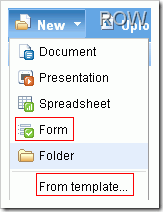
- Choose New > Form. [To speed up, you also have the option to choose a template form. Google keeps on adding new templates to gallery.]
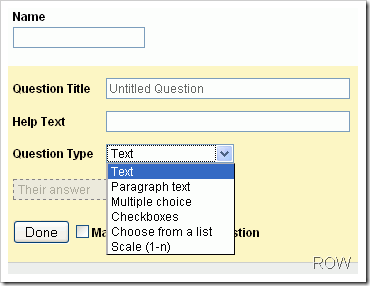
- Fill in your survey questions. Your survey questions can be in the form of text, multiple choice questions(radio buttons), drop downs, on a scale , free text(big rectangular box for detailed answers).
- You will see a URL on the bottom, that’s the URL to your survey.
- The answers will get collected in an spreadsheet residing in your Google Account.
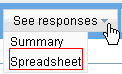
- To get notified as soon as someone submits a form click on See Responses > Spreadsheet.
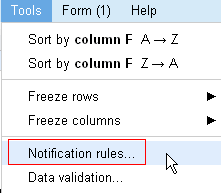
- Once you are on the spreadsheet go to Tools > Notifications rules.
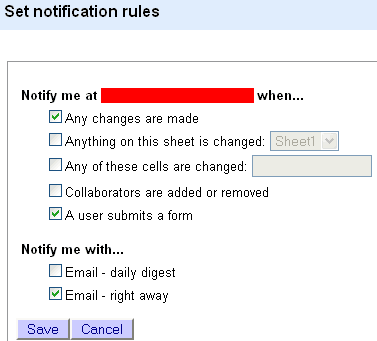
- Set the notification rules. If you want to receive a mail as soon as someone fills in the form check Notify Me When A user submits a form checkbox and Notify Me With Email Right Away checkbox.
You are done. Gozar!

 Ankur Jain is a Software Engineer in Test Automation. After a 5 years stint with Accenture and Oracle, he started his eLearning company. A long-time blogger and proud owner of the "Learn" series of websites.
Hello Nina!
I agree with you. SoGoSurvey IS the best survey tool. Especially their high-end reporting tools.
SoGoSurvey is in the technical and scientific survey business from almost a decade, and is slowly spreading its wings and are more concerned on offering a high end technical product, rather than gaining online popularity.
I have been a client with http://www.sogosurvey.com and have seen them introducing many new things in their products which is very neccessary for a survey tool. really appreciate their products approach.
what about the data security issues?
Is there a way we can prevent one user to vote multiple number of times?
Thank you. This information is very helpful for me because i am finding this type of tools so.. Now the end of finding…
Can you add attachments to this form?
To the Google Docs form? No, that’s not possible.
I assume you are talking about the survey URL. If yes, survey is hosted on docs.google.com itself and has not anything to do with your blog.
Thank you for sharing this one. It sounds better than the widget provided in Blogger. Just one (probably stupid) question. Is the url you use the front page of your blog? Or is it the post url?