
After seeing a recent blog post on Adsense Blog, I thought of experimenting with inline ads on one of my blogs hosted on blogger. I liked the tip about making the adsense inline with your blog post instead of putting it under the title or above the title.
Here I am reproducing what I did to my blogger hosted blog to make my adsense ads left align and wrapped around my content, the same way as can be seen on this blog post. THERE IS NO CHANGE TO ADSENSE CODE, SO NO NEED TO FEAR ABOUT GOOGLE TOS VIOLATION.
- Trust you already have adsense code set up below the post title. If not, follow instructions carefully on this post to add adsense below the post title.
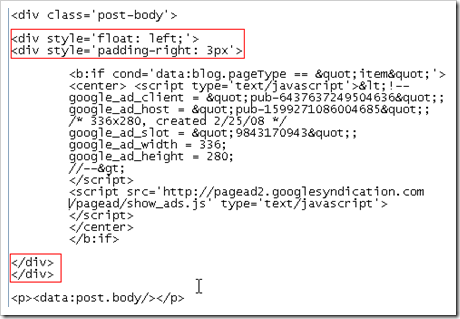
- Now, to put the ads on left side of your post. Add <div style=’float: left;’> and <div style=’padding-right: 3px’> before the adsense code. Don’t forget to close them with the </div> tags. Here is how it should look like.
- Now, to put the ads on right side of your post. Add <div style=’float: right;’> and <div style=’padding-left: 3px’> before the adsense code. Again, don’t forget to close them with the </div> tags. Here is how it should look like.
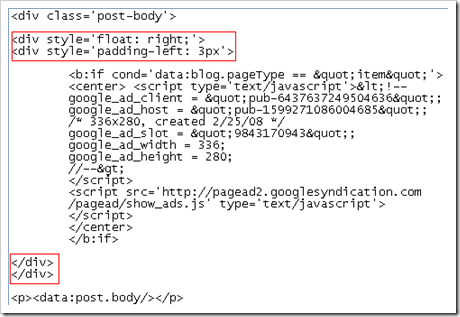
- Wondering why I have added padding-left or padding-right? This will ensure that your ad is separated by a safe distance from text. You can increase/decrease the pixels as per your requirement.
Also see, how to safely test adsense ads?

 Ankur Jain is a Software Engineer in Test Automation. After a 5 years stint with Accenture and Oracle, he started his eLearning company. A long-time blogger and proud owner of the "Learn" series of websites.
Thanks ankur, You got good knowledge, I’m glad to share your article on my blog!!
excellent tips implemented on my blog good work thanks
hi. thanks bro. it helped me a lot.
but i was wondering if you could help me a bit more. i was wondering if we could make use of the space available right to the ad in the post. maybe we could our facebook, twitter and rss subscription links.
do let me know if that is possible.
thanks.
Oyon
@Oyon: that should be doable. Create a div around the adsense ad and insert your subscription links inside it.
thanks this will help my website
Hey very nice blog!!….I’m an instant fan, I have bookmarked you and I’ll be checking back on a regular….See ya
I’m Out! 🙂
Excellent stuff! This is exactly what I needed for my website. Thanks for the post and have a happy new year 🙂
Thanks so much.
Great advice for this novice & explained really well.
Always nice to hear such responses. Thanks Bob 🙂
Thanks! These tips were great and really helped me to achieve the right kind of text wrap in just a few minutes. Thank you so much for the help! 🙂
Hi. I have used the code but i have got a message : Your template could not be parsed as it is not well-formed. Please make sure all XML elements are closed properly.
XML error message: Open quote is expected for attribute “{1}” associated with an element type “style”.
Plz help to correct this mistake.
@Adil: Can you check again with the EXACT code as mentioned above.
One of the best blog tip ..i have read in my entire bloggging career……it will help a lot….
Your template could not be parsed as it is not well-formed. Please make sure all XML elements are closed properly.
XML error message: Open quote is expected for attribute “{1}” associated with an element type “style”.
please help me i’m getting this error message in while i’m trying to save.
well i’m trying to use
1.How to safely wrap adsense around blog posts in blogger?
2.How to show adsense below the post title in your blogger hosted blog only on inner pages except on home page?
please reply
i use adbrite in this procedure…..
Thanks for the valuable information. It really helped me a lot.
Thanks for the margin tip.
4 easy step by step ways to insert adsense on the most effective locations:
Adsense Below post but above Comments:
http://bloggertinker.blogspot.com/2009/02/how-to-put-google-ads-below-post.html
Adsense Wrapped or Inline with your post:
http://bloggertinker.blogspot.com/2009/02/how-to-put-google-adsense-within-inline.html
Adsense directly below post title:
http://bloggertinker.blogspot.com/2009/02/how-to-put-google-adsense-below-post.html
Adsense directly below your header:
http://bloggertinker.blogspot.com/2009/02/how-to-put-google-adsense-below-header.html